My Current AI Workflow: Moving Toward Fluency at the Edge
A living document. Models ship new capabilities every few weeks — what's “the edge” today will look quaint in six months. Treat this as a snapshot, not a prescription.
Who this is for
Research development professionals (and adjacent roles) who are past the “is AI useful?” question and are now asking: how do I actually work with these tools at a fluent level? This is my current practice. Steal what's useful, ignore what isn't, and adapt it to the shape of your own work.
The core idea
Fluency at the edge isn't about knowing every new feature the day it ships. It's about having a repeatable process for turning a messy idea into a well-executed output — one that uses each tool for what it's actually good at, conserves your tokens and attention, and gets better every time you run it.
The workflow below moves across three surfaces:
| Surface | Best for | Why |
|---|---|---|
| Claude.ai (web chat) | Thinking, brainstorming, exploring | Low-stakes, conversational, fast to iterate |
| Claude Cowork | Context curation, document prep, collaborative work | Handles files and longer artifacts natively |
| Claude Code | Execution, building, running multi-step work | Persistent context, file system, agentic loops |
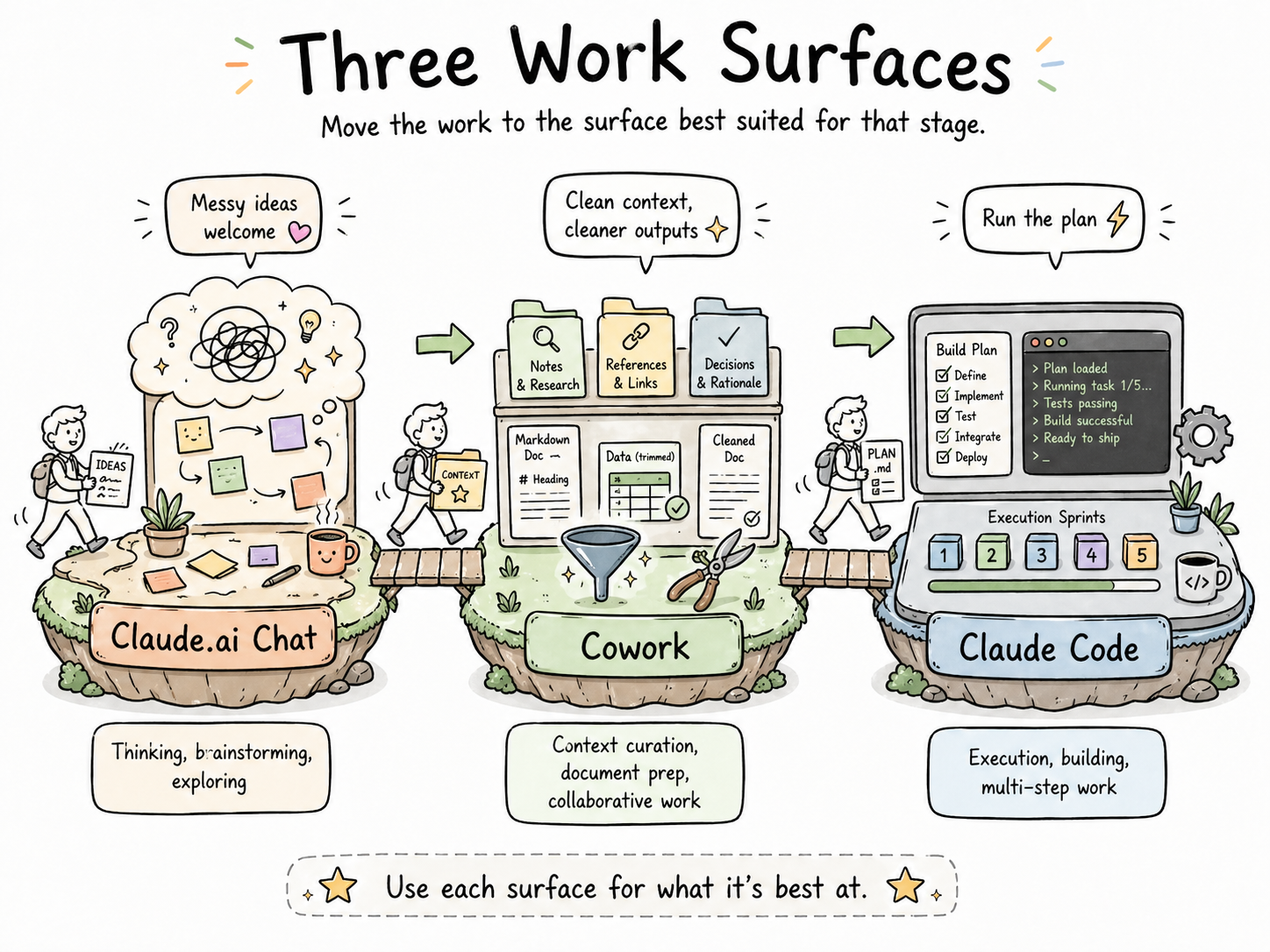
Most of my serious work touches all three.
The 10-step workflow
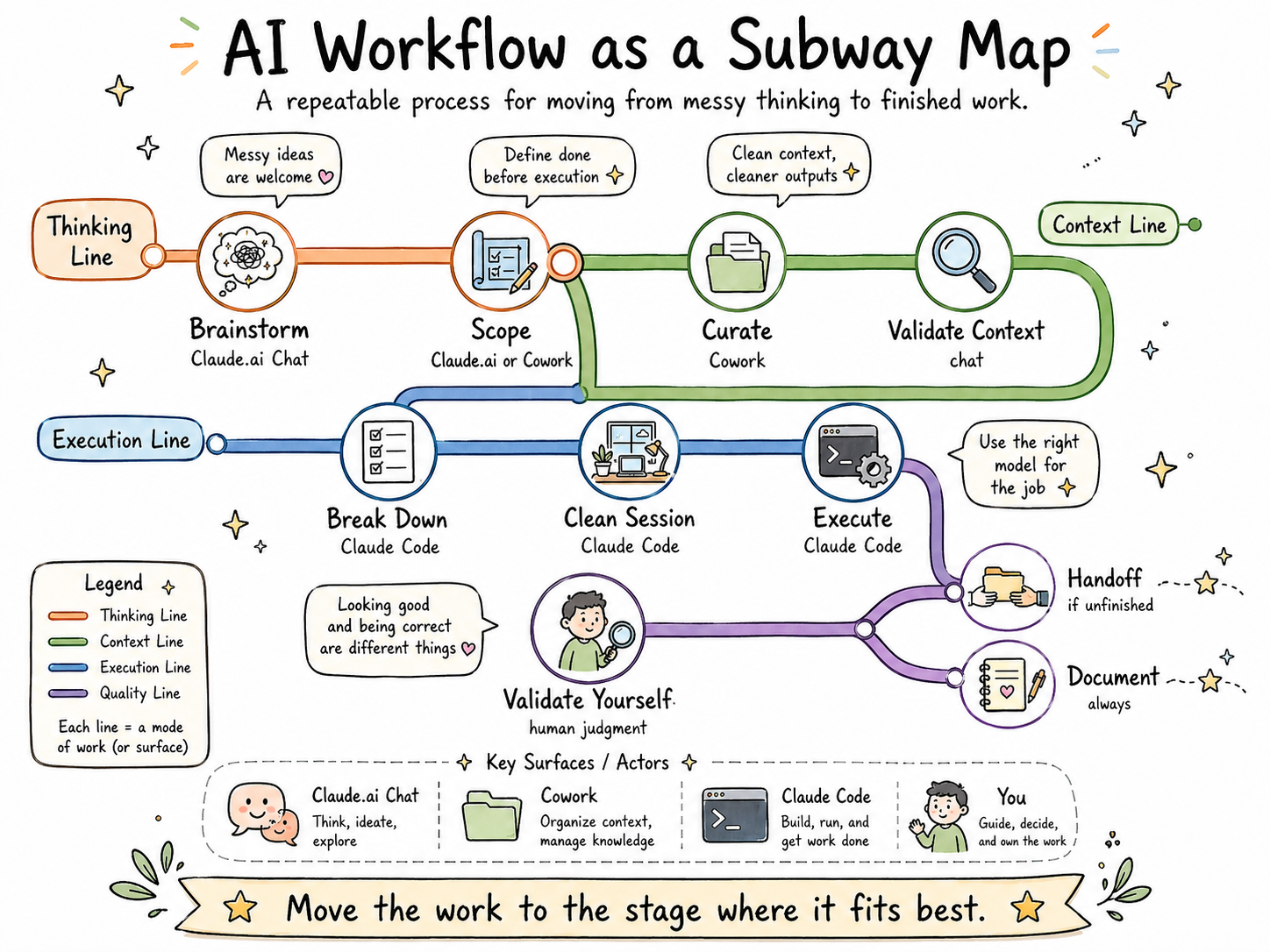
1. Brainstorm in Claude.ai chat
What I do: Open a fresh web chat and think out loud. I dump the whole messy shape of the task — what I'm trying to accomplish, what's unclear, what the pieces might be, what I'm worried about.
Why it matters: The web chat is exceptionally good at complex, ambiguous thinking. It's where I figure out what I'm actually trying to do before I commit any structure to it. For simpler tasks, I use a /brainstorming skill to skip the overhead.
Gotcha: Don't try to brainstorm and execute in the same chat. Brainstorming is divergent; execution is convergent. Mixing them pollutes both.
2. Curate and prep your context (Cowork)
What I do: Gather the documents, notes, and reference material the task needs. Convert Word and PDF files to markdown. Simplify spreadsheets down to their essential columns. Pre-summarize long documents. Pre-chunk cluttered ones. I use AI to do this prep, or free online converters for simple conversions.
Why it matters: This is the most underrated step in the whole workflow. Clean context means less model confusion, fewer tokens spent on formatting noise, and — maybe most importantly — it forces you to organize your own thinking before handing it off.
Rule of thumb: Markdown is the cleanest file format right now. PDFs, Word docs, and messy Excel workbooks burn tokens just on formatting. Those formats exist for human viewing, not model consumption.
Gotcha: Resist the urge to “just paste everything in.” More context isn't better context. Curated context is better context.
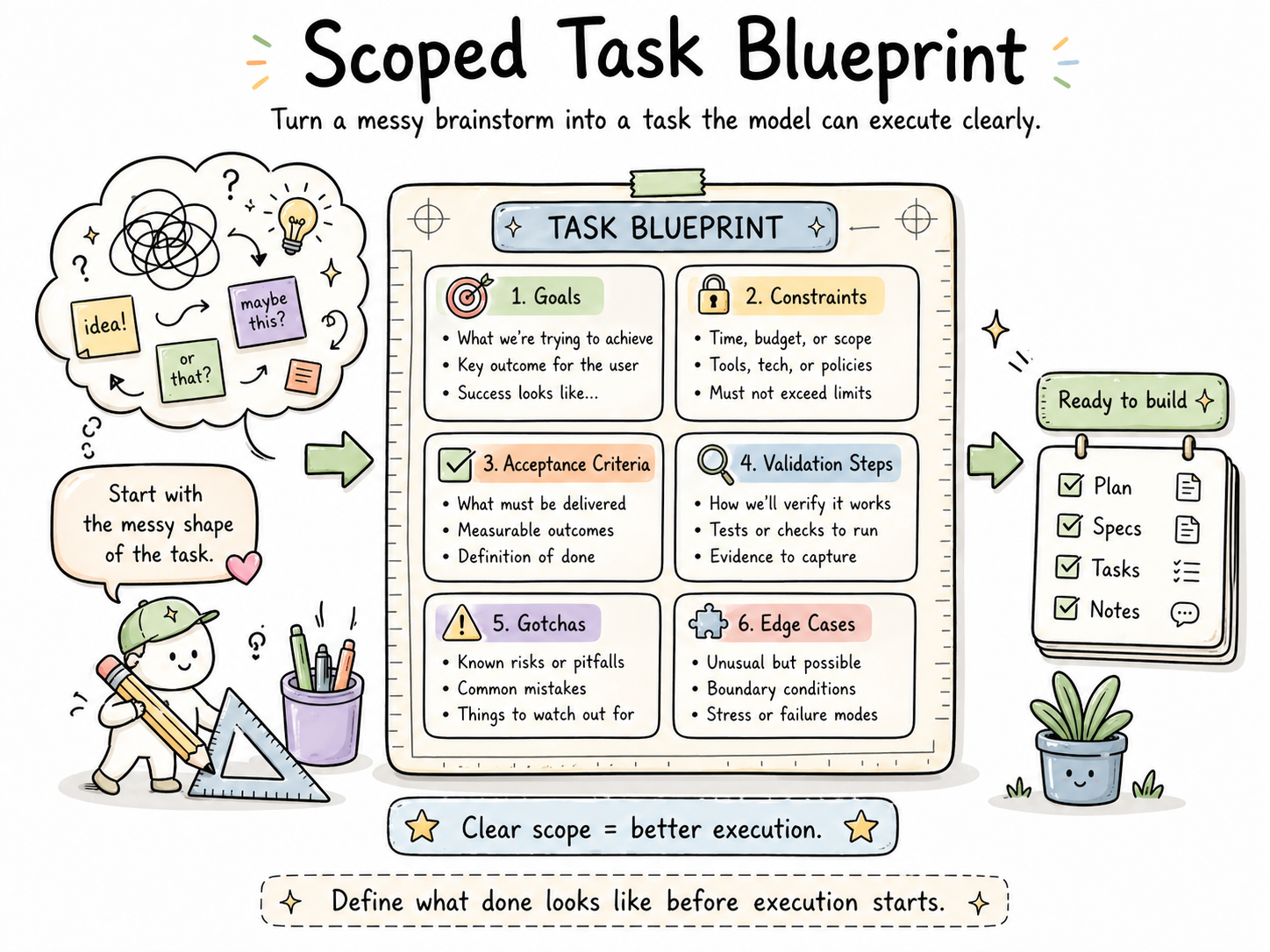
3. Turn the brainstorm into a scoped task
What I do: In Claude.ai or Cowork, convert my messy brainstorm into a clearly scoped task with:
- Explicit goals
- Constraints
- Acceptance criteria
- Validation steps
- Likely “gotchas” noted up front
- Edge cases considered
Why it matters: The most powerful models perform dramatically better when they know what “done” looks like before they start. Frontier models especially benefit from this — you're paying for their capability; don't waste it on guessing what you meant.
Make it a skill: This step is so repeatable that it should be a self-customized skill you reach for constantly, tailored to the type of work you do.
4. Validate context before you commit
What I do: Use a model to test the context I've assembled — ask it to restate the goals, surface assumptions, or identify anything it thinks is missing. If something new comes up, I add it to the scoped task from Step 3.
Why it matters: This is your last cheap chance to catch a missing piece. Finding a gap here costs a minute. Finding it on Step 8 costs a session.
5. Break the task into a to-do list (Claude Code)
What I do: Move to Claude Code and use the model to break the scoped task into a to-do list or build plan. My /prd skill handles this — it produces something between a PRD and a blueprint.
Why it matters: Large tasks fail in vague ways. A to-do list converts “build this thing” into a sequence of checkable commitments. It also gives you a natural place to pause and reorient.
6. Start a clean session with everything loaded
What I do: Open a fresh Claude Code session with the project folder, the scoped task, the to-do list, and any skills I'll need all loaded up front.
Why it matters: Context cleanliness compounds. A fresh window with intentional loading outperforms a long window that's been drifting for hours. Front-loading also beats parsing instructions across 10–20 turns — the model has the whole picture from the start.
Gotcha: “Loaded” doesn't mean “dumped in.” Make sure each thing you load has a reason to be there.
7. Execute — in sprints, with the right model for the job
What I do: Run the task. For large work, I build in blocks or sprints. This is also where subagents can run in parallel, with a higher-level model acting as supervisor and delegator.
Why it matters: Matching model to task is where token economy lives:
| Task type | Best-fit model |
|---|---|
| Orchestration, monitoring, planning | Claude Opus |
| Standard execution | Claude Sonnet |
| Straightforward code | Claude Haiku |
Don't blow your usage limits running a frontier model on tasks a smaller model handles well.
8. Validate the output — yourself
What I do: After the model validates its own output, I validate it independently. I flag inconsistencies, places the model made incorrect assumptions, or anything that looks “almost right.” Then I debrief with the model and add takeaways to that folder's CLAUDE.md file (local level).
Why it matters: Model validation catches internal consistency. You catch real-world correctness. Both are necessary. Neither is sufficient alone.
Anti-pattern: Skipping this step because the output “looks good.” Looking good and being correct are different things.
9. Write a handoff file if you're stopping mid-task
What I do: If the task isn't done and the context window is getting long, I ask the model to write a handoff.md noting what's complete, what remains, and any relevant context for the next session.
Why it matters: Future-you will not remember where you left off. A good handoff file is a gift to yourself.
10. Final documentation and reflection
What I do: At the end of a task, I review the original blueprint and update it with corrections for future reference. I note:
- Where did I change my mind?
- Would I have changed my approach if I'd known X?
- What would be useful for next time?
- What limitations exist now but could be handled later as models improve?
Why it matters: This is where a workflow actually improves. Without this step, you're running the same process every time. With it, each run sharpens the next one.
The visual
Principles that run underneath everything
These aren't steps. They're the ideas that make the steps work.
Build skills for repeated work
If you've done something more than three times, it should be a skill. Create your own or edit markdown files from others. Review your skills monthly so they don't go stale — they will change as models change. (See the skills primer for the full picture.)
Conserve tokens deliberately
Token economy is attention economy. Use the right thinking level for the right task. Keep context clean. Front-load information rather than parsing it across many turns. The goal isn't minimum tokens — it's tokens spent where they matter.
Prefer markdown for machine-facing work
Markdown is the cleanest format for models right now. Reserve PDFs, Word docs, and formatted spreadsheets for human viewing. If a model is going to read it, give it markdown when you can.
Treat every session as a chance to rethink
The best outcome of running this workflow isn't just a finished task. It's a sharper sense of how you work, where you waste effort, and what could be optimized next time. Use these sessions to think about how we work, not just what we're producing.
Common pitfalls
- Skipping context curation. Pasting raw files into a chat feels fast. It isn't.
- Brainstorming and executing in the same window. Two different modes. Separate them.
- Running a frontier model on a Haiku-sized task. Expensive, and usually no better.
- Not writing a handoff when you stop. You will regret this within 48 hours.
- Treating the workflow as fixed. It won't be. Revise it when your tools revise themselves.
Download
Want a copy to read offline or hand to a colleague?
Last updated: April 2026. This document will be revised as models and practices evolve.