Skills: A Primer
What they are, why they work, and when to build one.
The one-sentence version
A skill is a markdown file that teaches a model how to do a specific kind of task well — loaded only when the task calls for it, so it doesn't clutter every conversation.
That's it. The rest of this page is why that idea matters more than it sounds.
The key mechanism: When skills are available in a workspace, the model only reads each skill's name and description up front. The rest of the skill file isn't loaded into context until the model decides that skill is relevant to the current task. That's what makes skills scale — you can have fifty of them available and still pay the token cost of only the one or two you're actually using.
Quick note on timing: If you built a custom GPT in 2023 or 2024, skills are largely the modern replacement for that work. Custom GPTs were the best answer available when they shipped — but most have gone stale, and few are optimized for the models we have now. Skills are what you'd design if you were building for today's models and today's workflows: smaller, more composable, task-specific, and easier to maintain.
What problem do skills solve?
If you've worked with AI for any length of time, you've noticed a pattern: you end up writing the same instructions over and over.
“Summarize this into a short update for a PI. Lead with the ask. No preamble. Keep it under 150 words. Match the tone of the example I'm about to paste…”
You write that prompt on Monday. You write it again on Thursday. By the following Tuesday, you've written it seven times with slight variations, and by the end of the month you've lost count. Each time, you're paying the cost twice: your time writing it, and tokens the model spends parsing it.
There are three bad workarounds people try:
- Paste the same long prompt every time. Tedious, inconsistent, and it bloats every conversation with instructions the model may not even need for this specific task.
- Put everything in a “master prompt” or system prompt. Works for a while, then collapses under its own weight. Every task now drags around instructions for every other task.
- Just re-explain it each time. You get drift — slightly different outputs every time because slightly different prompts every time.
Skills solve all three problems with one move: put the instructions in a file the model loads only when the task calls for it.
How skills actually work
Think of skills as on-demand expertise.
A skill is a markdown file that lives in a known location (on your machine, in your project folder, or in a repo). Each skill has a short description at the top — this is the only part the model sees by default. When you ask the model to do something, it scans those descriptions, decides which skill (if any) matches the task, and then pulls in the full skill file. Everything else stays on disk.
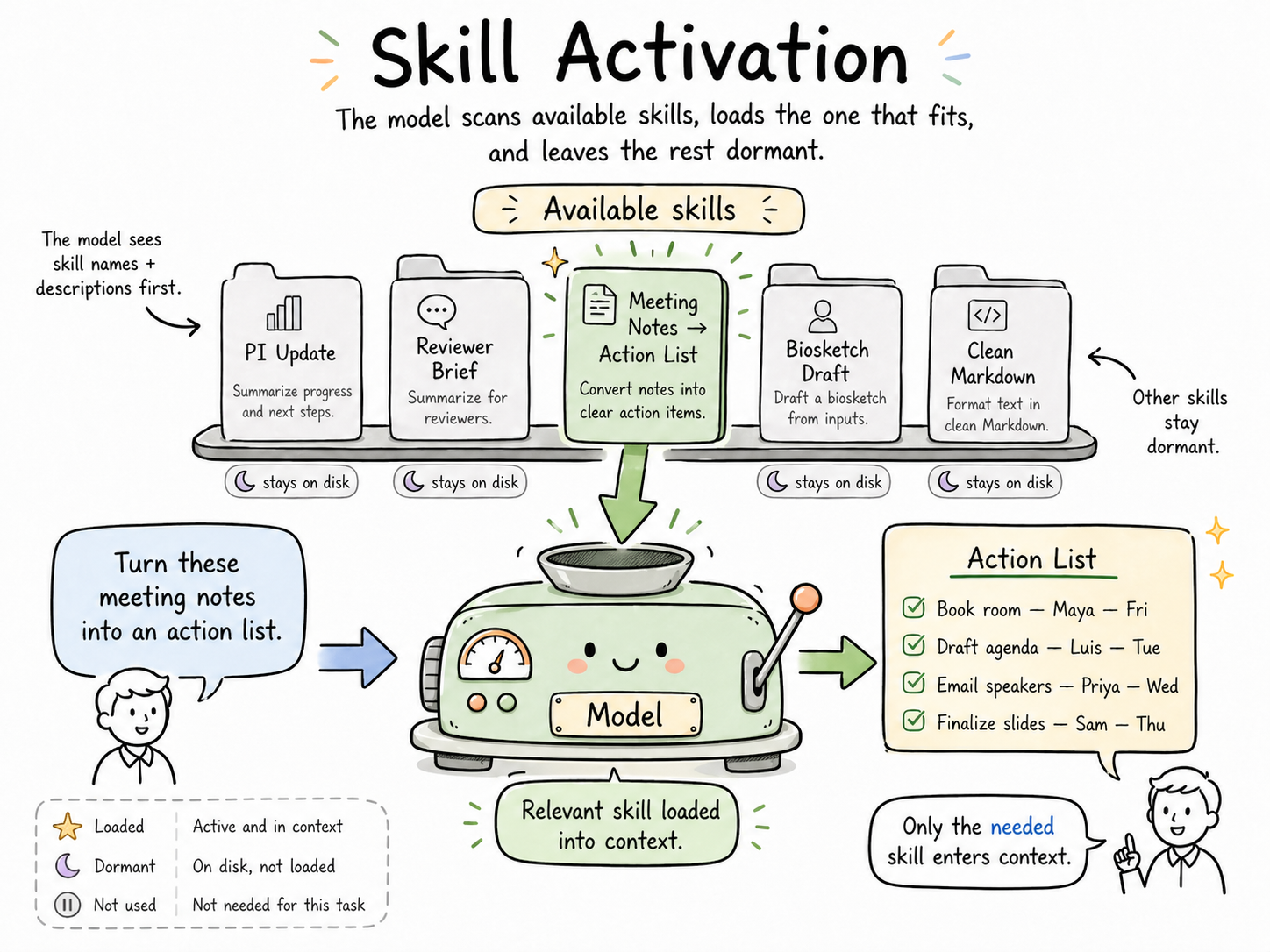
The task-matching is the key move. Your skill for “writing PI updates” doesn't affect your skill for “drafting biosketches.” The skill for “preparing reviewer score summaries” isn't loaded when you're brainstorming a poster outline. Each conversation carries only the expertise the task actually needs.
That single mechanism produces three effects that tend to surprise people the first time:
| Effect | Why it happens |
|---|---|
| Lower token use | Only the relevant skill is loaded — the other forty-nine stay on disk |
| Cleaner context windows | The model isn't juggling five sets of unrelated guidance; it has the one relevant set in front of it |
| Better, more consistent outputs | The same instructions every time means the same output quality every time, without re-explaining |
The token savings are real, but they're the smallest of the three benefits. The consistency is what changes how it feels to work.
One skill, one task
A skill should handle a discrete task, not a multi-step workflow.
If you catch yourself writing a skill that does Step 1, then Step 2, then Step 3, then hands off to Step 4 — stop. That's not a skill; that's a workflow made of skills. Each step is its own skill, and the sequencing is a job for you or for a model orchestrating the work.
The test: can you describe what this skill does in a single sentence without using the word “then”? If yes, it's a skill. If you need “then,” break it into two.
What goes in a skill?
A good skill has a tight internal structure. You don't need to memorize it — you can look at any well-written skill and see the shape:
- A description at the top telling the model when to use it (this is what the model matches against)
- The task the skill handles, stated clearly
- Constraints — things the output must do or must not do
- Examples — what good output looks like (and sometimes what bad output looks like)
- Edge cases — the “if you see X, do Y” guidance that prevents surprises
- Output format — what the finished work should look like when handed back
Think of it as the memo you'd write if you were training a sharp but new assistant who'd be doing this task for you dozens of times. You write it once. They execute it consistently.
Keep it short
Aim for 250 lines. Cap it at 500.
If your skill is pushing past 500 lines, something is wrong — almost always one of two things: you're trying to cram a workflow into a single skill (see “one skill, one task” above), or you're over-explaining.
Don't over-instruct the model
This is the most common mistake, and it comes from good instincts honed on older models.
The model already knows the basics. It knows what a paragraph is. It knows what a professional tone sounds like. It knows how to structure an email. You don't need to teach it those things. When you do, you're burning tokens and — worse — you're signaling that this is a task where basics are uncertain, which actually makes outputs less reliable.
Write skills like you're briefing a competent colleague, not training a high schooler. Skip the obvious. Spend your tokens on the parts that are specific to your task — the constraints, the edge cases, the format quirks, the things only you would know to ask for.
Rough test: if a sentence in your skill would be equally true for any writing task anywhere, cut it. The skill's value is in the non-obvious stuff.
When should you make a skill?
Two rules, and if a task passes either one, consider making a skill.
Rule 1: The Rule of Three
If you've done it more than three times, it should be a skill.
Three is the inflection point. Once is noise. Twice is coincidence. Three times means this is a pattern in your work, and the pattern is going to keep showing up. A skill pays for itself by the fifth or sixth time you reach for it.
Rule 2: The Instructions Matter More Than the Data
This is the filter that keeps people from trying to turn everything into a skill.
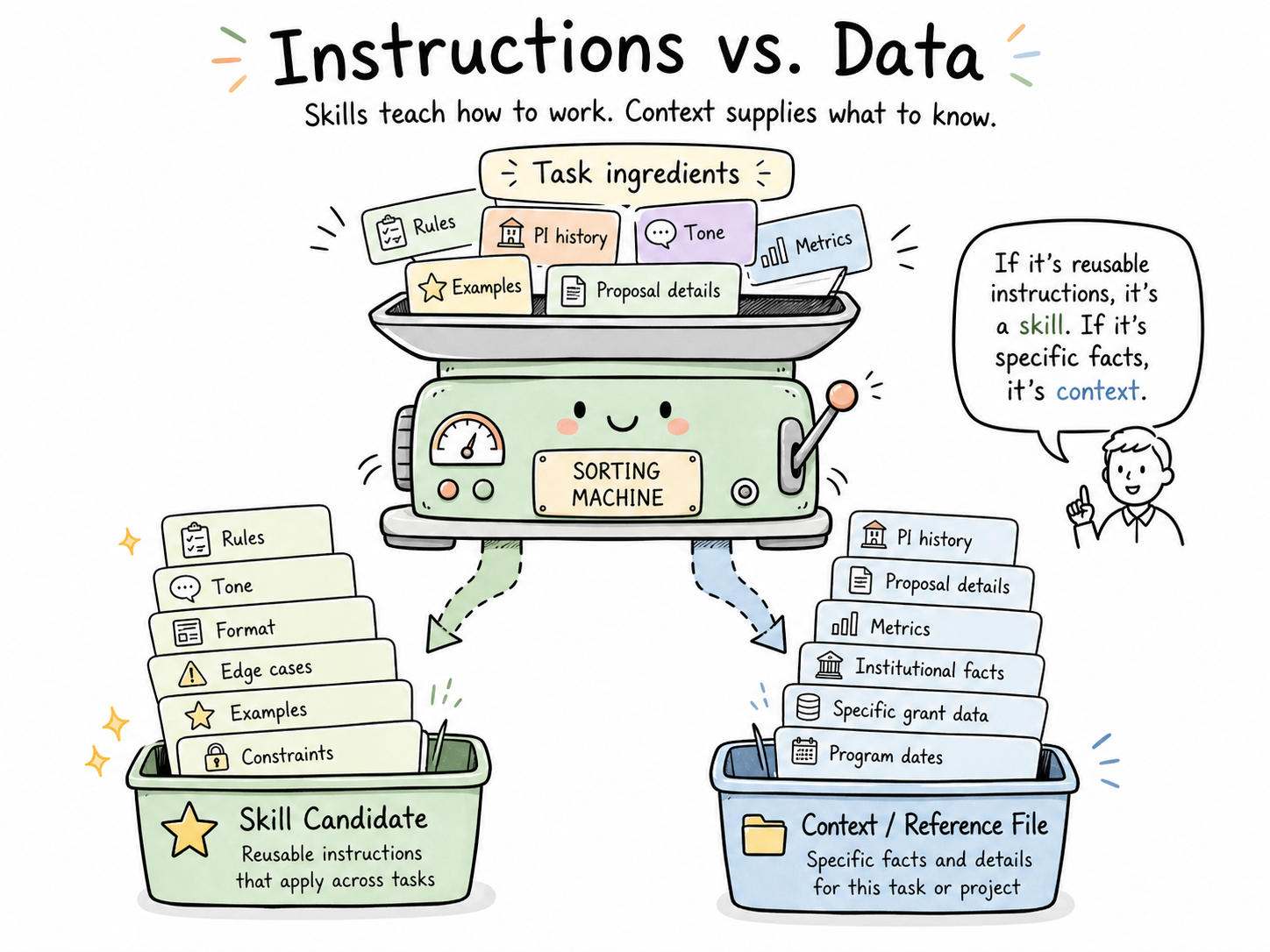
If the task is mostly about instructions — how to format something, what tone to use, what to include, what to exclude, how to handle edge cases — it's a skill candidate.
If the task is mostly about data — this specific PI's history, this specific proposal's contents, this specific training grant's metrics — it's not a skill. That's context, and context belongs in a portfolio of reference files, not in a skill.
The test: Could a colleague with the same role, at a different institution, use this skill meaningfully? If yes, it's about instructions. If no, you're trying to encode something that's really about your specific data.
Good skill candidates in research development
To make this concrete, here are tasks from RD work that tend to make excellent skills:
- Drafting a progress summary from a PI's grant update
- Writing reviewer-facing summary statements from score data
- Turning meeting notes into an action list with owners and dates
- Converting a messy Word doc into clean markdown
- Scoping a new task into goals / constraints / acceptance criteria (the Step 3 skill from the workflow guide)
- Drafting a trainee-facing email for a recurring milestone
- Building a reviewer brief from a proposal and an RFA
- Generating a faculty award nomination outline from a CV
Each of these: done more than three times, instruction-heavy, reusable across different specific inputs. Textbook skill territory.
Not good skill candidates
- “Summarize this one specific 40-page document.” (One-off task — just do it.)
- “Remember everything about my CRC portfolio.” (That's context, not a skill — it belongs in a personal context portfolio.)
- “Be smarter about grant strategy.” (Too vague — a skill needs a concrete task shape.)
Skills vs. the other things that sound like skills
The word “skill” is doing a lot of work right now, so a quick disambiguation:
| Thing | What it is | When to use it |
|---|---|---|
| A skill (Claude Code) | A markdown instructions file loaded on-demand for a specific task | Recurring tasks where instructions matter more than data |
| A project (Claude.ai) | A workspace with persistent files and custom instructions | Sustained work on one body of material |
| A custom GPT / Gem | A configured chat agent with its own instructions and optionally its own files | Mostly a 2023–2024 pattern — skills have largely taken over this role for individual use |
| A context portfolio | A structured set of files describing you that any AI can ingest | Personal identity, role, preferences — not task instructions |
A skill is the smallest unit in this list. That's the point. It does one thing well, and it composes with everything else.
The living part
Skills go stale. Models change, your work changes, better patterns emerge. Review your skills monthly. Not a full audit — just a quick pass asking:
- Is this still how I want this done?
- Did a model update make some of this advice redundant?
- Did I learn something new worth adding?
The skills you use most will drift the fastest, because you'll notice more friction with them. That friction is the signal to revise.
If a skill hasn't been used in six months, archive it. If one keeps getting used in ways it wasn't designed for, split it into two.
Build your own — or start from someone else's
The fastest way to get good at skills is to read a few well-made ones, then write one of your own.
I'm building a public repo of skills tailored for research development work — customized versions of patterns I've refined over the last year, with commentary on why each decision was made and where you should customize them for your own context. When it's live, it'll be linked here.
Until then, the shortest path to your first skill is:
- Pick a task you've done five times this month.
- Write down, in plain markdown, how you want it done — rules, examples, gotchas.
- Add a one-line description at the top saying when it should be used.
- Try it on the next instance of that task.
- Fix what didn't work. That's iteration one.
That's the whole job. Every skill you use started as someone's rough first pass at that exact exercise.
Where skills fit in the bigger picture
Skills are one piece of a larger pattern: building personal AI infrastructure that travels with you across tools.
A complete setup has three layers:
- Who you are → your personal context portfolio (identity, role, preferences, constraints)
- What you know → your open-brain / memory layer (domain knowledge, past decisions, reference material)
- How you work → your skills library (task instructions, recurring patterns, quality standards)
Skills are the “how” layer. They're the smallest and most portable piece. You can start here without having built the other two, which is why this is often the best entry point.
The other layers are worth building — and I'll be writing about both — but skills are where the fluency curve bends fastest.
Download
Want a copy to read offline or hand to a colleague?
Last updated: April 2026. Skills are a fast-moving concept; this will be revised as patterns evolve.