A meeting facilitation agent for research development
A facilitation agent isn't a transcription tool. Transcription tools record what happened. A facilitation agent helps the meeting go better.
It tracks the agenda against the clock, captures decisions as they're made, notices when a topic has been re-litigated for the third meeting in a row, and prompts the host when the conversation has drifted or stalled.
The agent and its harness
The agent itself is small. The reasoning core is just a model. What makes it actually facilitate is everything wrapped around it — the harness. The harness is what gives the model eyes (the live transcript), ears (the memory of past meetings), context (the agenda, the prep doc, the per-meeting facilitation objectives), hands (the ability to write back to memory and surface prompts to the host), and rules (the customizable skill files that define how it behaves).
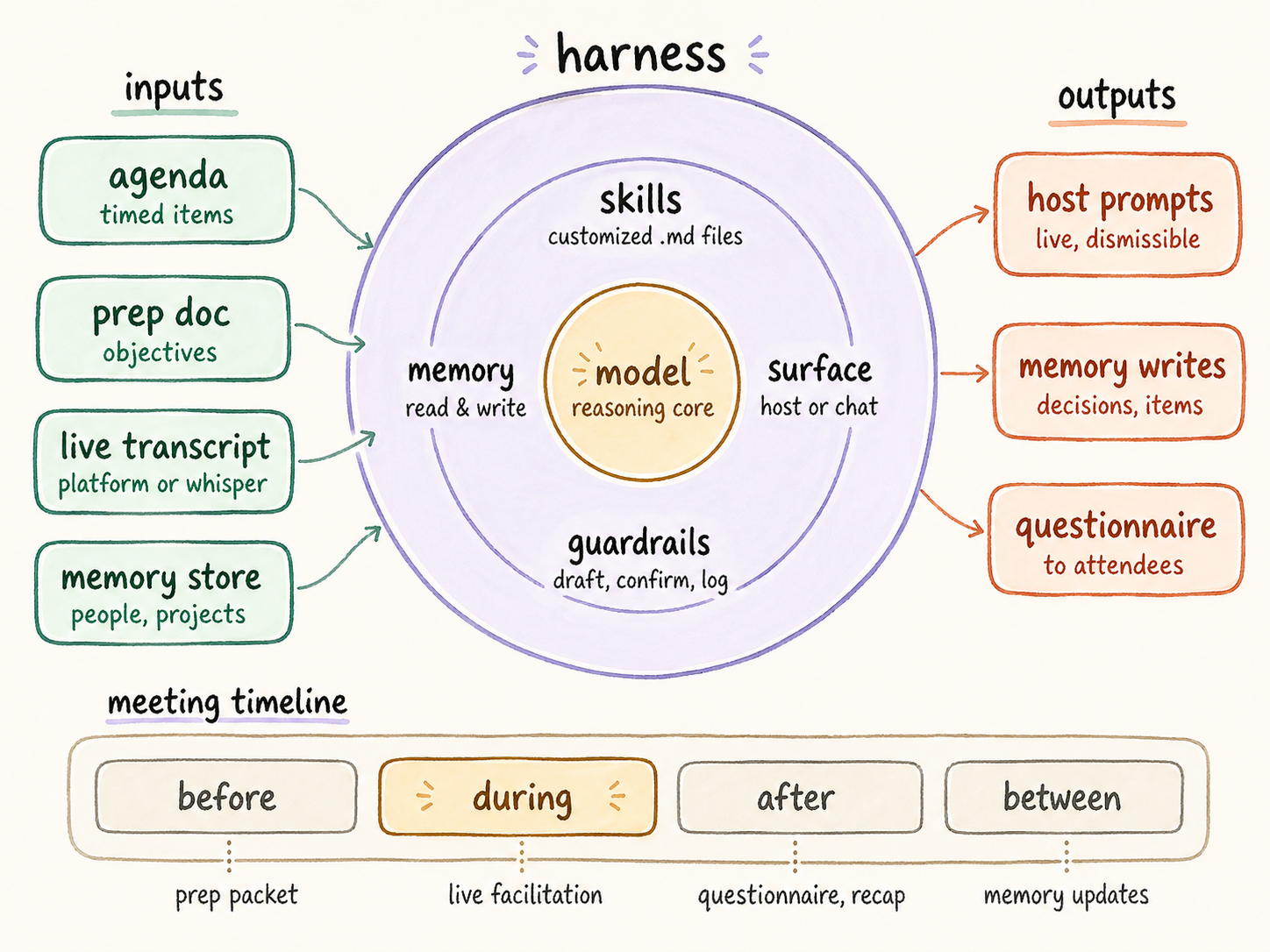
The diagram shows the shape of the running system. Inputs flow into the harness on the left: the agenda with its time allocations, the prep doc with the meeting's desired outcomes, the live transcript stream from whichever capture mechanism the team uses, and the persistent memory store of people, projects, and prior decisions. Outputs flow out on the right: live prompts surfaced to the host's screen, structured writes back to the memory store, and a post-meeting questionnaire that confirms decisions and action item ownership before any recap is sent.
The bottom strip shows the four phases the harness operates across. Before the meeting, it generates per-attendee prep packets. During the meeting, it runs the five facilitation primitives — agenda tracking, decision capture, re-surfacing detection, off-track/stuck prompting, and provisional action item capture — surfacing each to the host without disrupting the meeting. After the meeting, it sends a questionnaire to confirm what was captured, then generates personalized recaps. Between meetings, it reconciles open action items and updates the memory store so the next prep packet is smarter than the last.
Why this version is different
What makes this version of the system different from a generic meeting AI is that the memory store grows. Every meeting writes to it. Every reconciliation cycle prunes it. The agent that prepares for next week's meeting has more context than the one that prepared for this week's. The infrastructure is doing the institutional-memory work that a human research development professional would otherwise carry in their head.
What's inside the document
The document walks through the seven decisions a team has to make before building one of these — capture mechanism, intelligence layer, memory storage, facilitation provider, surface choice, transcription source, orchestration, delivery, and sensitivity tier. Each decision comes with a trade-off table. Two of the workflows — the live facilitation script and the post-meeting questionnaire — are externalized as customizable skill files, with skeletons in the appendix.
It's a template, not a finished product. The intent is for a research development professional to read it with their boss, IT partner, or developer, fill in the decision points, and walk out with a partially-completed document their team can build from.
Download the document
Grab a copy in the format that fits your workflow. The Markdown version is best for AI tools and version control; the Word version is best for sharing with collaborators who prefer to redline in Word.